 GeekyAnts
Enterprise power, without the enterprise drag
Launch on-brand pages without waiting on developers.
Your marketing team builds and publishes pages in minutes — with the components your developers already made.
- Built on your design system
- SEO checked on every publish
- Runs on your own servers
- New pages without a deploy
- Always on brand
- Page templates
- Draft preview on the real site
- Scheduled publishing
- Menus that never break
- Redirects in the CMS
- SEO audit on every publish
- Sitemaps
- Structured data
- Found by AI assistants
- Analytics without code
- Search Console in the admin
- Cookie consent built in
- Your colours and fonts
- Fast cached pages
- Media library
- Lead forms
- Multiple languages
- Roles & permissions
- Full audit trail
- Google sign-in
- Self-hosted
Who AntPage is for
Companies whose website matters to the business, that already have a design system — and a marketing team that should not need a developer for every page.
Marketing & digital teams
Ship campaigns on your schedule
Build landing pages from approved sections, preview them on the real site, schedule them and get them found — with no developer ticket and no deploy.
Engineering & design-system teams
Build a component once, never a page again
Your components become what editors fill in. Developers stop doing content changes, and the site cannot drift from the design system.
Enterprise & regulated teams
Stay in control of every change
Run it on your own infrastructure, sign in with your company Google domain, and see who changed which field, when and from where.
The problems AntPage takes away
What slows a marketing site down today, and what your team gets instead.
| Without AntPage | With AntPage |
|---|---|
| Every new landing page is a developer ticket, a sprint and a deploy. | Marketers build and publish the page themselves, from sections developers already shipped. |
| Pages slowly drift off brand as people improvise layouts. | Editors can only use your real design-system components, so every page stays on brand. |
| A page moves and menu links break; redirects wait on a server change. | Menu items follow the page wherever it moves, and editors set redirects in the CMS. |
| SEO is checked by hand, after launch, if at all. | An SEO audit compares the CMS with the live page on every publish. |
| Shared logins and no record of who changed what. | Google sign-in for your domain, role permissions and a field-level audit trail. |
| A second site or app means a second CMS. | Every website and app reads the same pages from one API. |
What changes on day one
- Deploys needed to launch a new page
- 0
- Of every page built from your own components
- 100%
- Ready-made components on day one
- 54
- API for every website and app you run
- 1
See how it works
From idea to live page, in minutes
Real recordings of the product. Pick a step, or let the tour play.
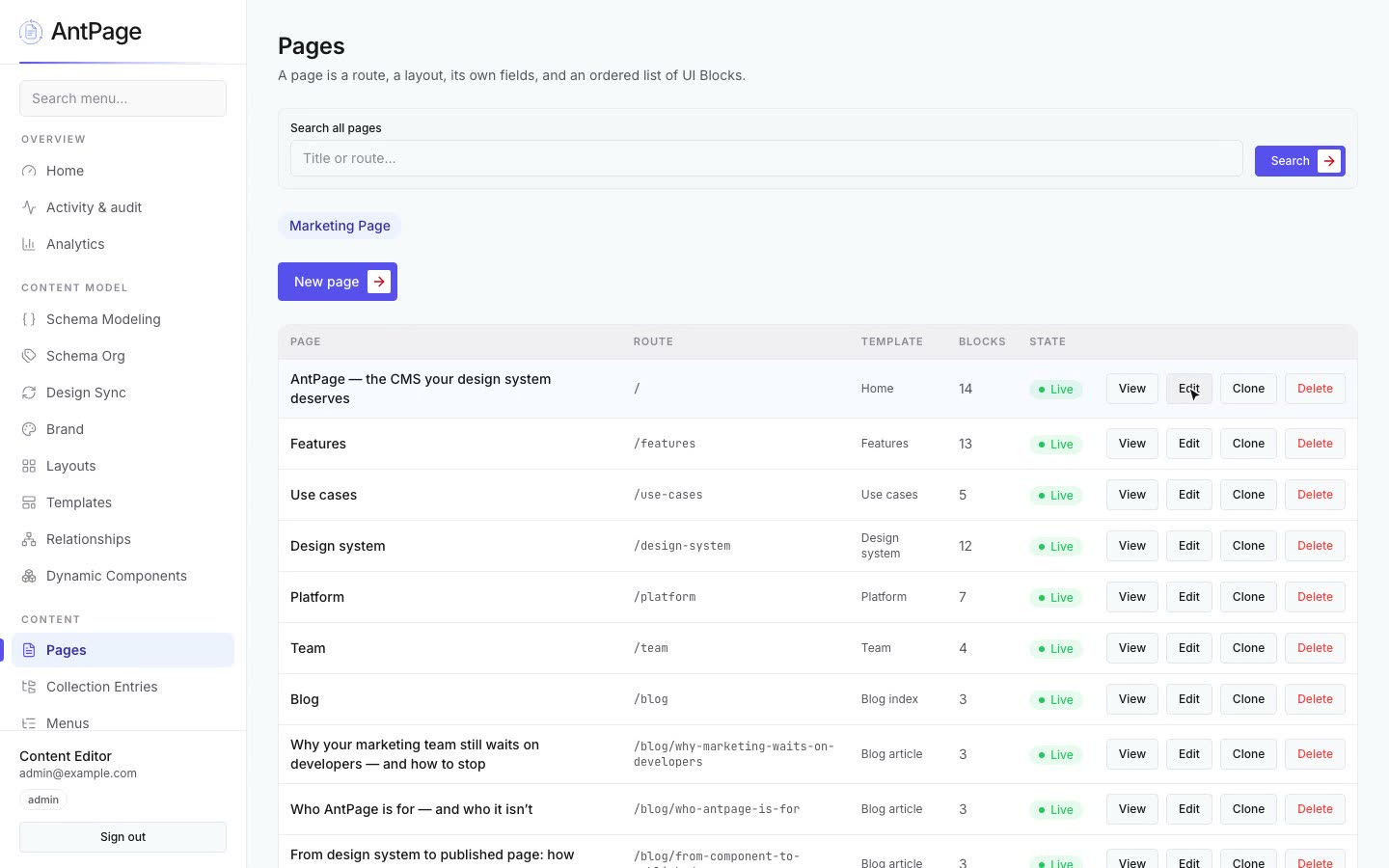
Pick a template, add sections, write the words and preview it on the real site — no developer ticket.
Everything a content team needs, nothing it has to work around
Six capabilities that ship in the box — no plugins, no enterprise upgrade.
Content that fits the design
Every field an editor sees comes from a real component, with validation, so content always fits the layout.
Pages without a ticket
Templates, reusable sections and a live preview on the real site before anything goes public.
Links that never break
Menus point at pages, not pasted URLs, and redirects are set by editors — no server change.
SEO built in
Meta tags, structured data, sitemaps and an audit that checks what the live page actually serves.
Found by AI assistants
llms.txt and markdown versions of every page, so assistants read your site as well as people do.
Governed by default
Roles and permissions, a field-level audit trail and an activity dashboard — included, not an upsell.
How AntPage compares with Adobe Experience Manager
Two good tools, built for different jobs. Here is where each one fits — from Adobe’s public documentation, October 2026.
AntPage
Your design system, as a CMS
Pages are built only from your own components, synced from code, and the CMS controls layout, menus, redirects and SEO.
Adobe Experience Manager
The enterprise experience platform
Sites, assets, translation and personalisation in one Adobe suite. Best for global brands already invested in Adobe Experience Cloud.
| Capability | AntPage | Adobe Experience Manager |
|---|---|---|
| Approach | Website CMS built on your design system | Enterprise CMS and digital experience platform from Adobe |
| Where it runs | Yes:Your own infrastructure (Docker) | Yes:Adobe-hosted Cloud Service, or AEM 6.5 on your own servers |
| Who builds the components | Yes:Your React and Next.js developers, in the stack they already use | Partly:AEM specialists, in Java and HTL on Adobe’s stack |
| Pages built from your own design-system components | Yes:Design Sync turns component schemas into content types | Partly:Your components rebuilt as AEM components |
| Editors arrange page sections | Yes:Ordered sections, templates and layouts | Yes:Drag-and-drop page editor with editable templates |
| Menus that follow pages when they move | Yes:Items point at pages; versioned, with diff and rollback | Yes:Navigation built from the page tree |
| Redirect and gone rules (301, 302, 404, 410) | Yes:Authored in the CMS, applied before the page renders | Partly:Rewrite maps at the Dispatcher, managed with ACS Commons or code |
| XML sitemap | Yes:Built in | Yes:Built in, configured by developers |
| SEO audit of the live page | Yes:Compares the CMS with what the page serves, on every publish | Partly:AEM Sites Optimizer, licensed separately |
| schema.org structured data | Yes:Type and field mapping built in | Partly:Built into components by your developers |
| Ready for AI agents (llms.txt, markdown, API catalogue) | Yes:Built in | Partly:Adobe LLM Optimizer, licensed separately |
| Analytics tags and cookie consent set from the admin | Yes:GTM, GA4, Hotjar, Clarity, Meta and LinkedIn by ID, with a consent banner you word | Partly:Through Adobe Experience Platform Tags, a separate tool |
| Search Console and GA4 dashboard in the admin | Yes:Clicks, impressions, position, visitors and top pages, from your own Google | No:Not built in; Adobe Analytics is sold separately |
| Brand colour, corners and fonts set in the admin | Yes:A legibility-checked palette, corner style and self-hosted fonts, versioned | Partly:Style System — authors pick styles developers defined |
| Draft preview | Yes:On the real site, token-gated | Yes:Preview mode and a preview tier on Cloud Service |
| Roles and permissions | Yes:Built in | Yes:Users, groups and fine-grained access control |
| Field-level audit trail | Yes:Built in — before and after for every field | Partly:Page versions you can compare, and an audit log of events |
| Activity report — who published and changed what, from where | Yes:On the admin dashboard, by day, with sign-ins and IndexNow | Partly:Audit logs of page and publishing events |
| Single sign-on | Partly:Sign in with Google, only for your company email domains — no passwords | Yes:Adobe IMS with your own identity provider |
| Languages, localized URLs and per-entry overrides | Yes:A language list, /fr-style URLs, a language switcher and per-entry overrides | Yes:Language copies and multi-site live copies |
| Whole-page translation | No:Not yet | Yes:Translation projects, with machine and vendor connectors |
| Personalisation and digital asset management | No:Not built in | Yes:With Adobe Target and AEM Assets |
| Plugin ecosystem | No:No plugin marketplace | Yes:Adobe Exchange and the ACS AEM Commons library |
Yes: Built inPartly: Partly, or via plugin, plan or your own frontendNo: Not built in
Where AntPage goes further
Included in AntPage — and either missing from AEM or sold as a separate Adobe product.
Your real components, synced
Design Sync reads each component’s schema and makes it a content type — editors fill in the React components your developers ship, not AEM rebuilds of them.
No AEM specialists needed
Your frontend team works in React and Next.js, the stack it already knows — no Java, HTL or OSGi to learn or hire for.
Redirects editors can own
301, 302, 404 and 410 rules are authored in the CMS and applied before the page renders — no Dispatcher configuration.
SEO checked on the live page
On every publish, an audit compares what the CMS holds with what the page actually serves — part of the product, not a separate licence.
Ready for AI agents
llms.txt, markdown on request and an API catalogue, so assistants read your site as well as people do.
Google numbers in the admin
Search Console and GA4 — clicks, impressions, visitors and top pages — from your own Google, beside the pages they describe.
From the blog
How marketing and design-system teams ship pages without waiting on developers.
- 12 October 2026Why your marketing team still waits on developers — and how to stopRead the post
Every new landing page turns into a ticket, a sprint and a deploy. The fix is not a faster dev team; it is giving marketers the components developers already built.
- 12 October 2026Who AntPage is for — and who it isn’tRead the post
AntPage is not a CMS for everyone. It is built for companies with a design system whose marketing team should publish without waiting on developers. Here is how to tell if that is you.
- 12 October 2026From design system to published page: how AntPage worksRead the post
Developers build components once, AntPage turns them into an editor’s toolkit, and marketers publish pages that every frontend reads from one API. The four steps, in plain words.
Learn more about AntPage
Watch it in a minute, see every feature, or meet the team behind it.


Who is AntPage for?
Companies with a design system — or a component library they want to grow into one — whose marketing team publishes pages often and should not wait on developers to do it. It suits product and SaaS companies, enterprises running several sites, and regulated teams that need an audit trail and their own hosting.
Who is it not for?
A personal blog, a small site without developers, or a team that wants to assemble a site from themes and plugins. WordPress or a hosted site builder will serve those better.
What does my team get out of it?
Marketers launch and change pages themselves. Developers stop doing content tickets and only build components. The brand stays consistent because editors can only use real components, and SEO and governance come built in.
Can I see Search Console and Google Analytics numbers in the CMS?
Yes. The Analytics screen shows clicks, impressions, click-through rate and position from Google Search, and users, sessions and page views from Google Analytics 4 — with top queries, top pages, channels, devices and countries — for the last 7, 28 or 90 days. You connect your own Google once, with a service account.
Can marketers add Google Analytics or an ad pixel without a developer?
Yes. On the Tracking screen you paste the ID for Google Tag Manager, GA4, Hotjar, Microsoft Clarity, Meta Pixel or LinkedIn, switch it on and publish — no code and no deploy. The cookie banner, its wording and your consent rules are set on the same screen.
Do I need to build my own frontend?
No. AntPage decides the page — its route, layout, sections in order, menus and SEO — and a thin renderer draws it with your design system’s components. If you have other frontends, they can read the same pages over the delivery API.
Do editors need to know code?
No. Editors work in the admin with a built-in authoring guide. Developers own the components; editors own what goes in them.
What is it built on?
A Laravel API on PHP 8.3, Next.js and React for the admin and website, MariaDB, Redis and S3-compatible object storage.
How do people sign in?
With Google, restricted to the domains you allow. There are no passwords to leak, and the API token never reaches the browser.
Can I see it running?
You are looking at it: every section on this page was authored in AntPage and delivered through its API.
When is Adobe Experience Manager the better choice?
When you already run Adobe Experience Cloud — Analytics, Target, Assets — and want one vendor for content, personalisation and digital assets across many brands and markets, with the budget and AEM specialists to run it.
When is AntPage the better choice?
When you have a design system and want editors to build and publish on-brand pages with it — with redirects, SEO, AI readiness and governance included.
Get started
Bring your design system. We’ll bring the CMS.
See AntPage working with your own components. AntPage is built and supported by GeekyAnts — a product engineering company since 2006, rated 4.9/5 on Clutch.